
Recommended Talent in the Screening List
View AI-recommended talent candidates filtered by your saved screening criteria and job description in one centralized screening list.
Instaffo automatically suggests suitable talent for eligible active positions. You’ll find recommendations directly in your screening list, alongside applications for the same position. That means you can review everyone for a position in one place. 🚀
Where to find recommendations
Select a Stelle and open the Screening tab. Recommendations are based on the saved individual criteria that are also used for AI screening. If no criteria are available or their generation was declined, the job description is used instead.
A recommendation looks like an application row and is labeled Empfehlung next to the person’s name. Recommendations count toward your screening counter and the count of unseen items.
The tiles above the list also include recommendations, such as Top-Talente, Weitere Talente, and your Screening-Fortschritt. As soon as you send a request to a recommended person or dismiss them with Passt nicht, they’re considered reviewed. Once you’ve reviewed them all, you’ll see Alle aktuellen Talente geprüft.
Hide recommendations
If you only want to review applications, use the Empfehlungen anzeigen toggle above the list. Turn it off to see only applications. The counters, tiles, and focus view will then also include applications only. Your choice applies to all positions until you close the browser tab. The toggle only appears when there are open recommendations.
If you request new recommendations while the toggle is off, we’ll turn it back on as soon as the new recommendations are available.
When you’ll get new recommendations
- When you activate your position, we’ll find the first suitable talent for you.
- After you give feedback, we’ll keep looking. Once you send a request to a recommended person or dismiss them with Passt nicht, you’ll get new recommendations the next morning. This continues as long as you keep giving feedback.
- If your position is full or recommendations are piling up, we’ll pause automatic recommendations. This happens if a position already has enough open applications or interviews, or if open recommendations are piling up. Once you’ve processed some, recommendations will resume the next morning. You can still use Empfehlungen anfordern at any time.
- At the click of a button, we’ll search right away. Click Empfehlungen anfordern above the list, and our agent will immediately search for suitable talent for that position. This usually takes a few minutes. Once the search is complete, you’ll get an email, even if we didn’t find anyone this time. You can request recommendations as often as you like, without giving feedback first. Each request also means you’ll get another round of recommendations the next morning.
- If you don’t give feedback or make a request, we won’t send you new recommendations. That way, unreviewed talent won’t pile up in your list.
- While a position is paused, no new automatic recommendation batches will be delivered. Recommendation announcements and reminder emails are paused too. Any recommendations already there will remain visible, and you can request recommendations yourself.
- When you resume a paused position, a new recommendation period begins with a fresh batch. You can receive at most one batch per day. If you’ve already requested a batch earlier that day, the new one may not be delivered until the following day. The reminder sequence starts over too.
How recommendations differ from applications
A recommended person hasn’t applied to your position. We suggested them to you. This means a few things work differently:
- The name is blurred. Hover over it to see: Der Name wird sichtbar, sobald das Talent deine Anfrage annimmt.
- The résumé and chat are locked. You’ll see Lebenslauf noch gesperrt and Chat noch gesperrt. They remain locked while your request is open, not just before you send it.
- The person hasn’t answered your screening questions yet. When you send them a request, the screening questions are asked automatically.
- The date shows when we recommended the person, not when they applied. Once you’ve sent a request, it shows how many days are left before it expires.
Everything else will look familiar: the same icons for Rahmenbedingungen, the same Standort column, and the same groups for Top-Talente and Weitere Talente. AI screening checks recommendations against the same requirements as applications, so you’ll see the same Match column too.
In the detail view, you’ll see the Match-Zusammenfassung with each requirement, assessment, and explanation. Click the number next to an explanation to jump to the relevant section of the person’s profile.
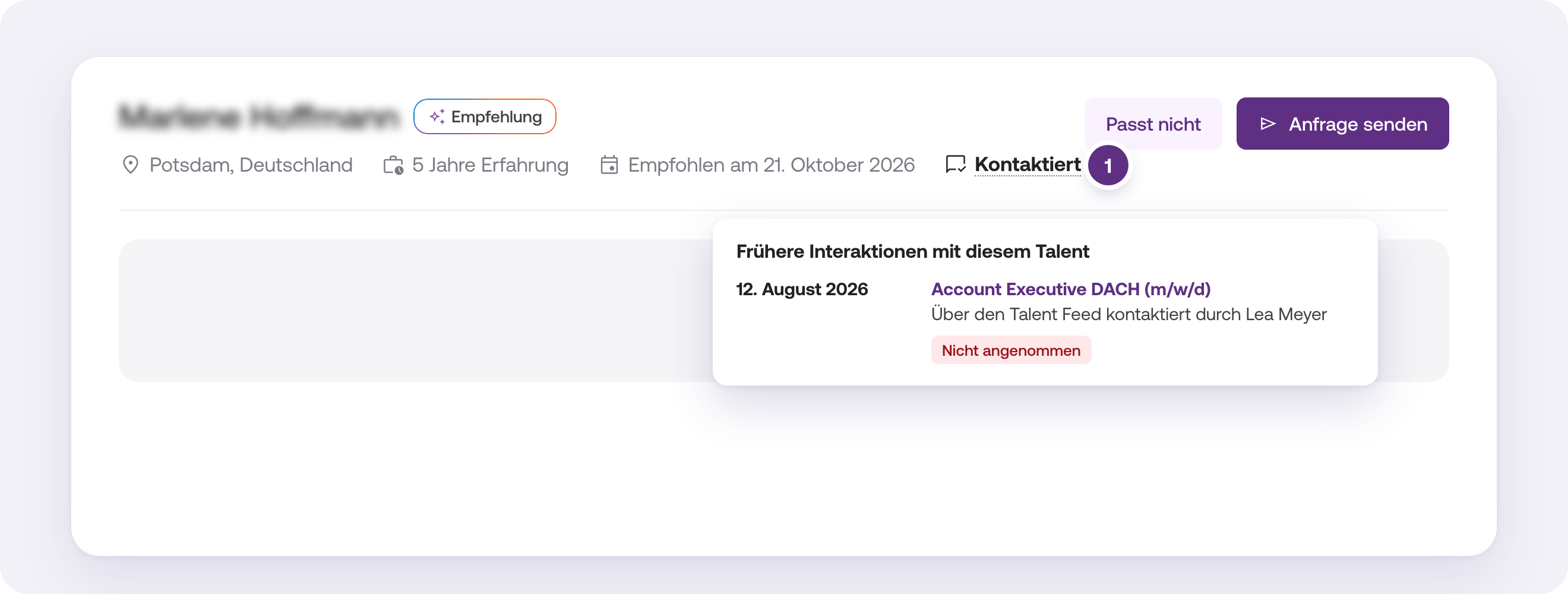
If you’ve already contacted the person, for example through the Talent Feed, you’ll see the Kontaktiert badge in the detail view. Click it to open Frühere Interaktionen mit diesem Talent and see when and for which position you contacted them. That way, you won’t contact anyone twice.
Sort the list
Use the sort menu above the list to sort applications and recommendations together:
- Beste Matches zuerst or Schwächste Matches zuerst: sort by the match from AI screening. This is the default sort order.
- Neueste zuerst or Älteste zuerst: sort by the date in the Datum column. For requested recommendations, the date of your request is used.
- Nächster Standort zuerst or Entferntester Standort zuerst: sort by the distance between the person and the nearest location for your position.
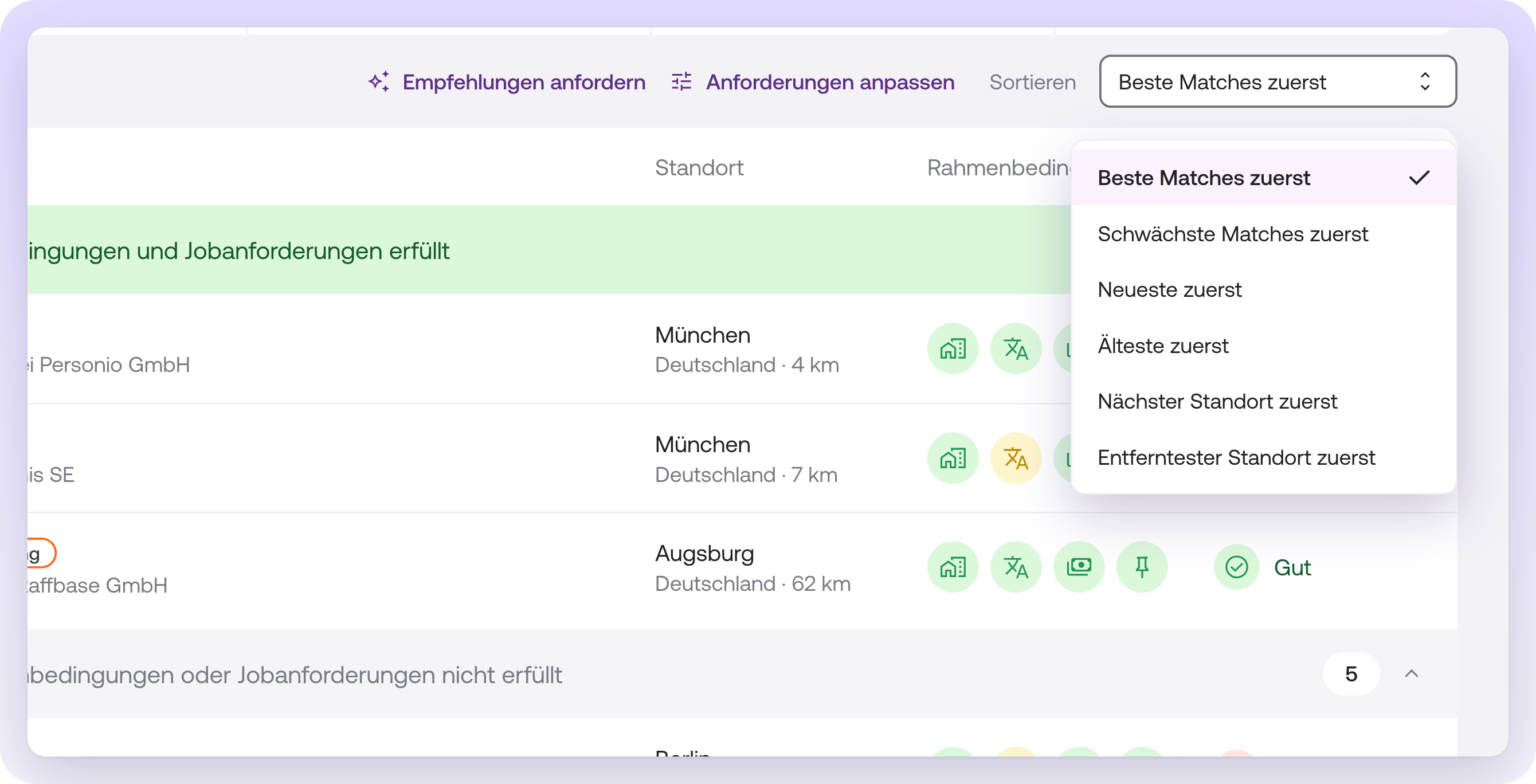
You can also click the Datum and Standort column headers directly. The top group always stays at the top, and items are sorted within each group. In the focus view, you’ll go through talent in the same order.
What you can do with a recommendation
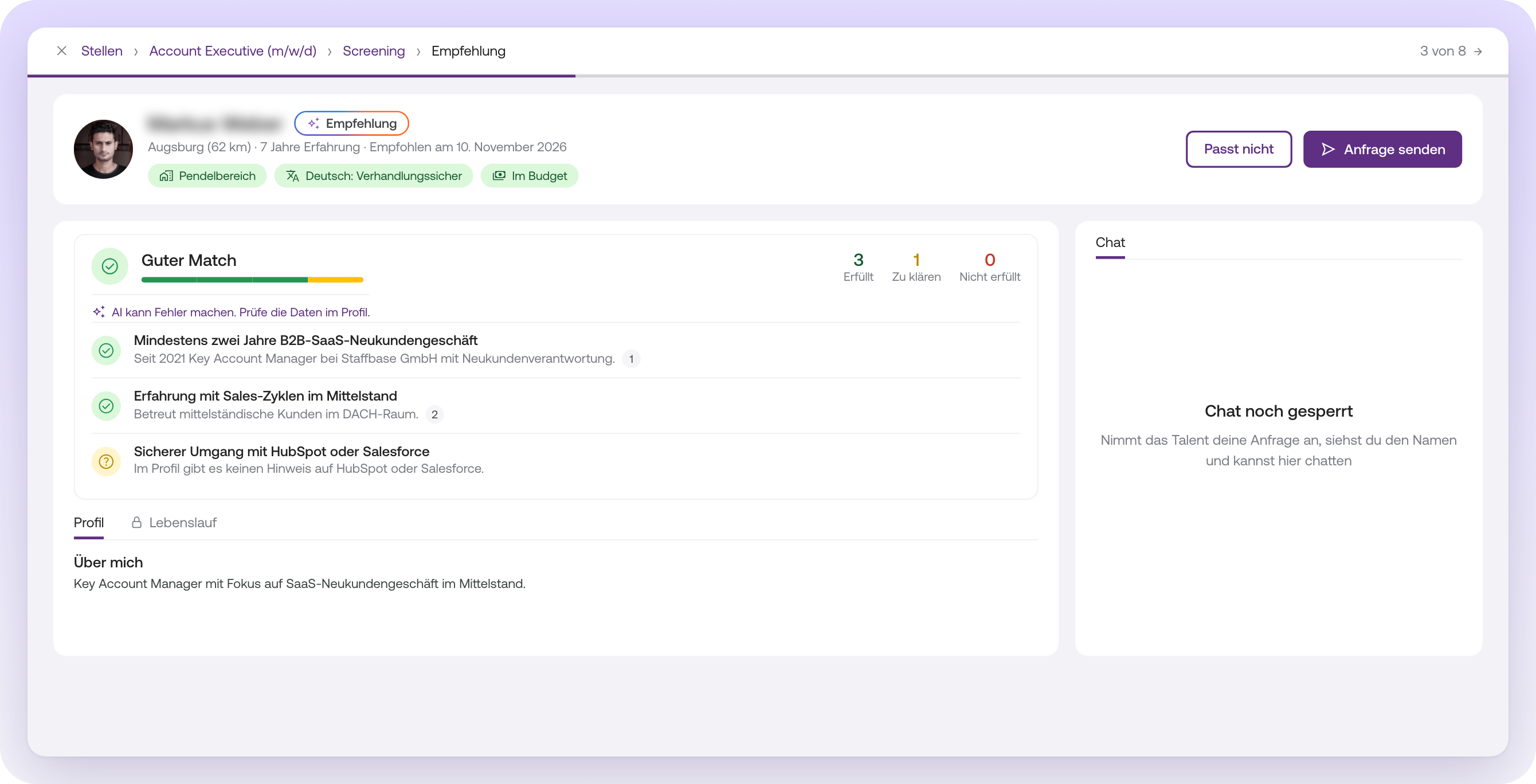
There are two buttons in the panel on the right:
- Anfrage senden: Invite the person to your position. They have 7 days to respond. The recommendation then disappears from the Screening tab, the screening counters, and focus navigation. Instead, you’ll find it in the Talent Feed’s Invited list. If the person accepts, it becomes a regular application, their name becomes visible, and the chat opens. If you withdraw the request, the recommendation returns to the Screening tab.
- Passt nicht: The recommendation disappears from your screening list.
For recommendations, the button is called Passt nicht, not Ablehnen. This is intentional: the person never applied to your position, so they will not be notified of your decision.
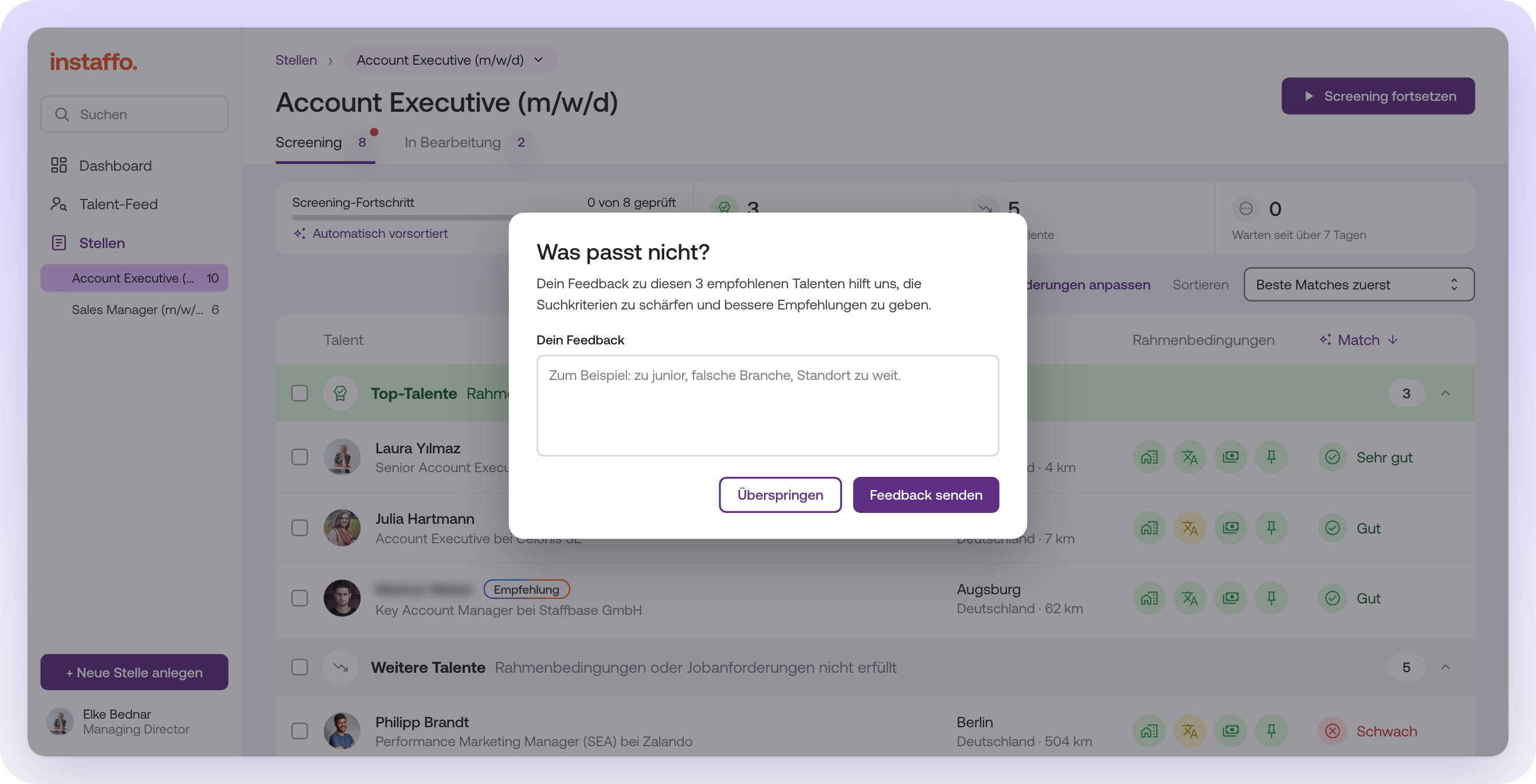
If you like, you can provide a reason when dismissing someone. Your feedback helps us refine the search criteria and provide better recommendations in the future.
If you hide multiple recommendations at once, including in a mixed selection, a shared feedback dialog appears for the whole group. Feedback is optional: if you skip or close the dialog, the selected recommendations will still be hidden. A single recommendation works differently: if you close its feedback dialog, the action is canceled. Every time you select Passt nicht, you’ll get new recommendations the next morning.
You can use the checkboxes on the left to select recommendations just like applications and process several at once. If you dismiss multiple recommendations at once, we’ll ask for a reason once. It will apply to everyone you selected. You can also continue without giving feedback by clicking Überspringen.
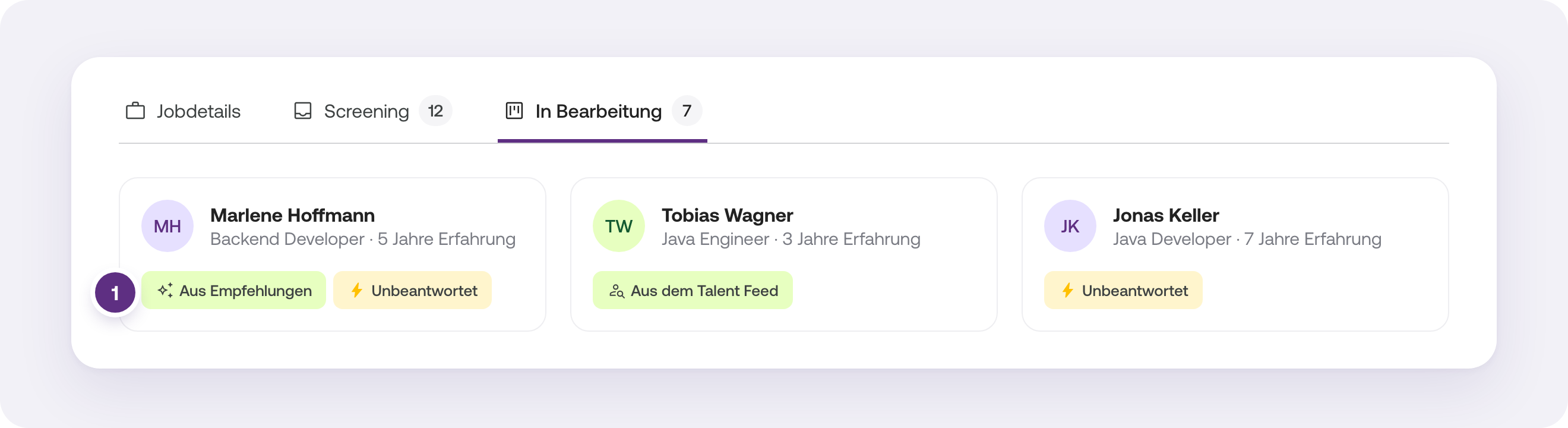
If a recommended person accepts your request, the application in the In Bearbeitung tab will have the Aus Empfehlungen badge. This helps you see later which candidates came from a recommendation.
Why a recommendation disappeared
A recommendation leaves your screening list if:
- The person applies themselves. You’ll then only see the application. It will remain in your list even if your original request expires later.
- Your request expires without a response. The person declined, or the 7 days are up.
- You dismissed them with Passt nicht.
- The person is no longer available on Instaffo, for example because they paused their profile or made it private.
Filters and search in the combined list
Some filters can’t be applied while recommendations are in your list. A recommendation isn’t an application yet, so it doesn’t have notes, answers, interviews, or labels for a filter to use.
This affects text search, labels, hiding archived items, open answers, requested feedback, unread notes, and upcoming interviews.
We let you know when these filters are affected instead of silently ignoring them. Otherwise, rows you intended to hide could remain in your list without you noticing.
If you don’t see any recommendations
- Is the Empfehlungen anzeigen toggle off? That means recommendations are currently hidden. Turn it back on.
- Check that you’ve selected exactly one position. The overview for multiple positions only shows applications.
- The position must be active. We don’t recommend talent for inactive positions.
- Have you already processed the current recommendations? New ones arrive the morning after you give feedback. Automatic recommendations are also paused if your position is full. If you don’t want to wait, use Empfehlungen anfordern to request new ones right away.
- Not every position gets recommendations. The number we find depends on how many people match your requirements.
Reviewing recommendations and applications in one place saves you time: fewer tabs, one decision per person, and an overview that really includes everyone who might be right for your position. 🙌
 Powered by happysupport.ai